
How to Analyze Your LinkedIn Outreach Data for Free
How to download your LinkedIn data export and analyze outreach response rates for free. Three approaches from manual Excel analysis to an open-source outreach analytics tool.
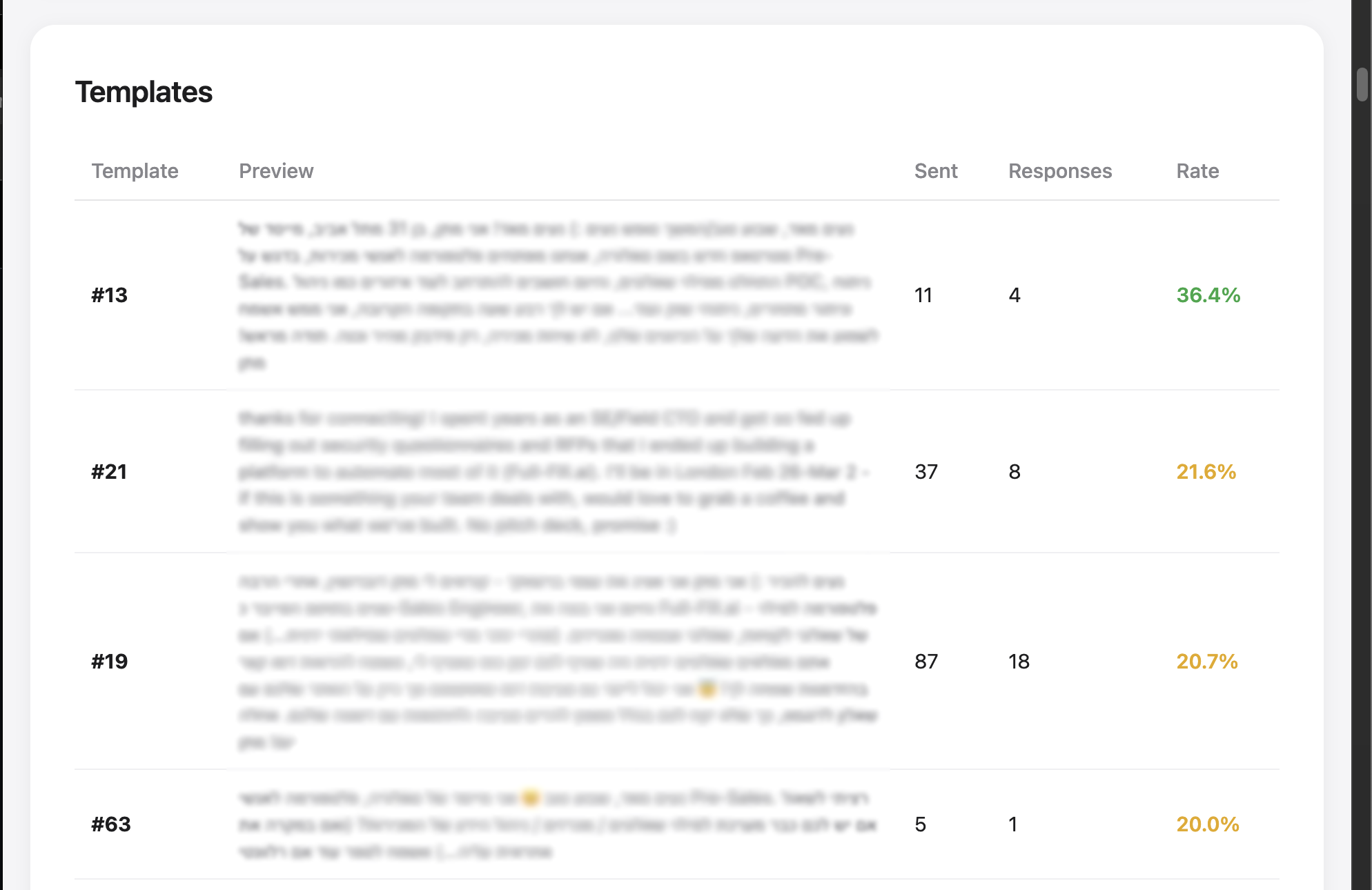
If you are running outbound campaigns on LinkedIn - whether targeting CEOs, VPs of Marketing, or sales leaders - you have probably tested different templates, adjusted your messaging, and iterated on timing. But how do you actually measure what is working?
Most teams rely on gut feeling or anecdotal feedback. The irony is that LinkedIn already provides you with a complete archive of every message you have ever sent and received - for free. Timestamps, full message content, response data, connection history. It is all there, sitting in your account settings, waiting to be downloaded.
This post walks through how to get that data, and three practical ways to turn it into insights you can act on today.
How to Download Your LinkedIn Data
The process takes about two minutes, though LinkedIn may need a few hours to prepare your export.
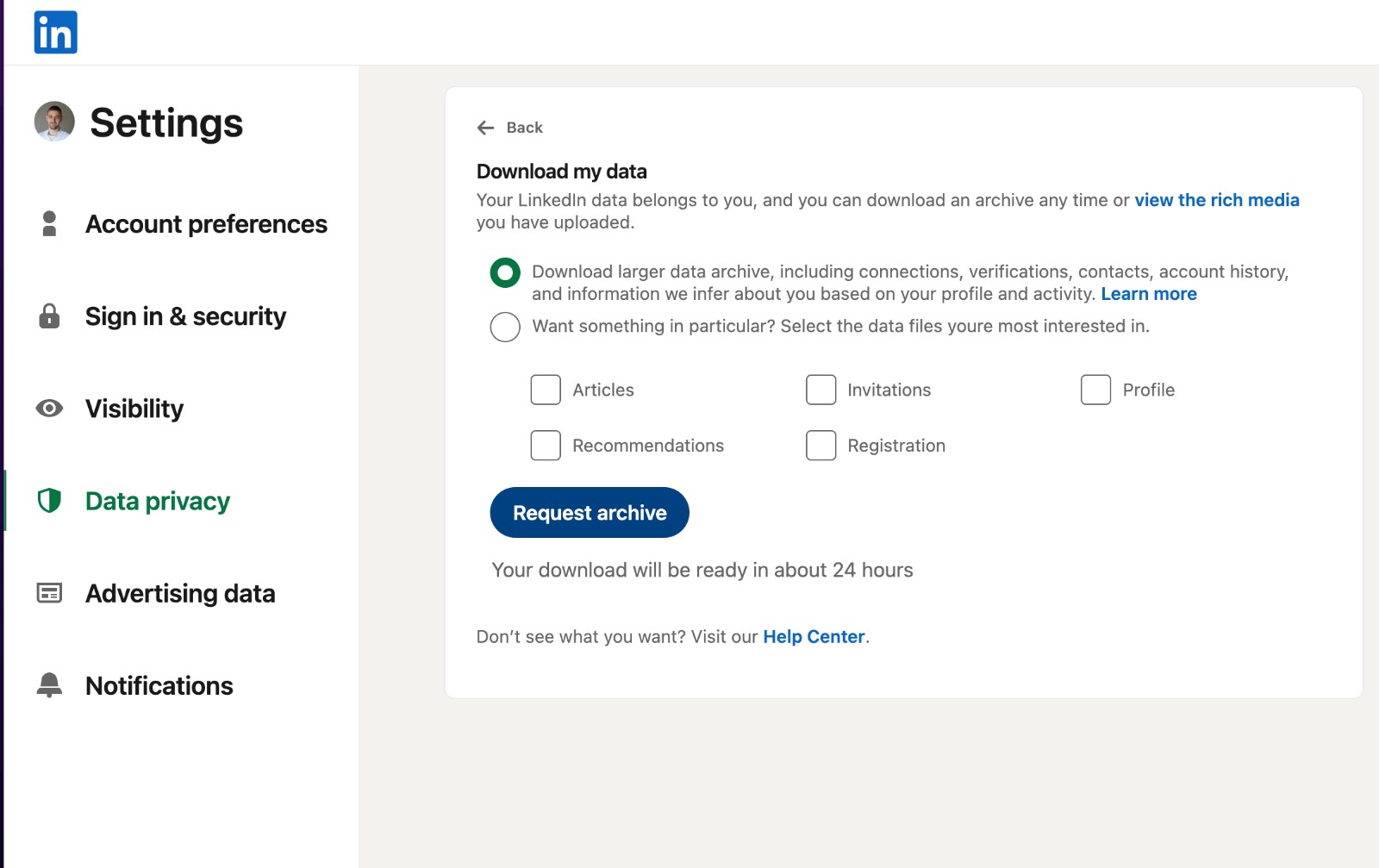
- Go to Settings & Privacy in your LinkedIn account
- Navigate to Data Privacy > Get a copy of your data
- Request your archive and wait for the email notification
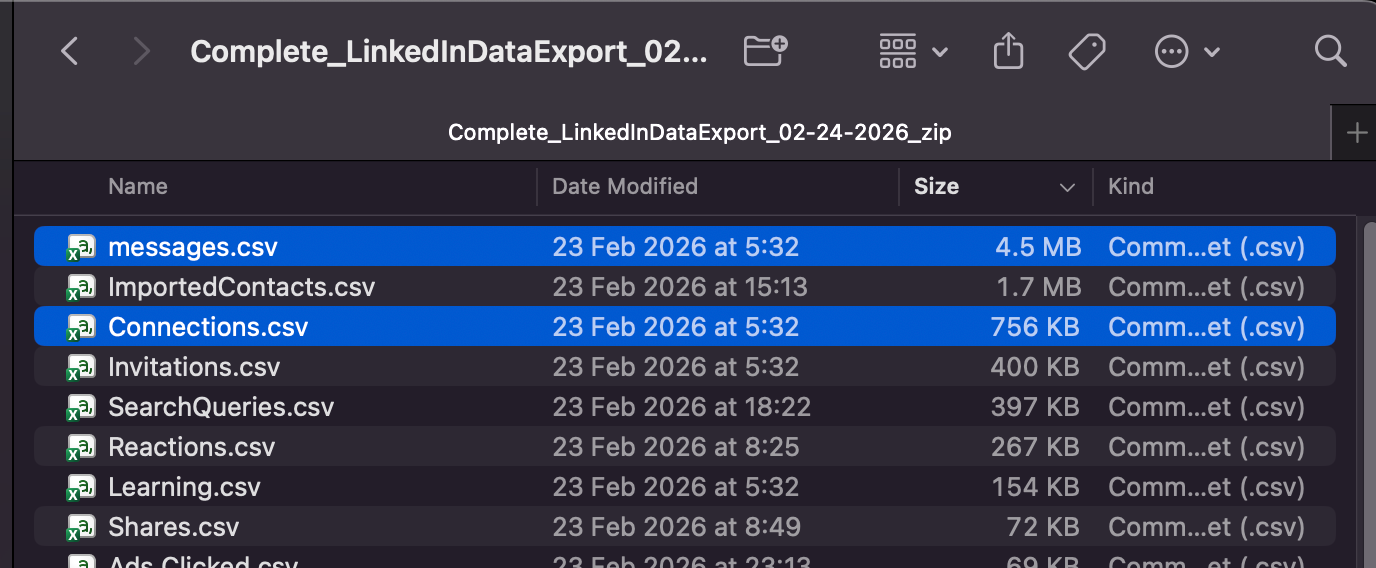
- Download and extract the ZIP file
Inside, you will find messages.csv and Connections.csv - a complete record of every conversation and connection. This is the raw material for everything that follows.
What Makes This Data Valuable
For anyone doing outbound outreach at scale, this archive answers the questions that matter most:
- Which message templates actually get replies? Not which ones feel good to write - which ones produce responses.
- Which personas respond best? Are CTOs more responsive than VPs of Sales? Does your messaging resonate differently across seniority levels?
- When should you send? Is there a day of the week or time window that consistently outperforms?
- How fast do people respond? If someone does not reply within a certain window, should you follow up or move on?
These are not hypothetical questions. The answers are already in your data.
Three Ways to Analyze Your Outreach
Depending on your technical comfort level and how deep you want to go, there are three practical approaches.
Approach 1: Manual Analysis
Open messages.csv in Excel or Google Sheets. Filter by messages you initiated, sort by response status, and start looking for patterns. This works for small datasets and gives you a hands-on feel for the data.
Pros: No tools required, immediate access, full control. Limitations: Time-consuming, difficult to cluster similar templates, hard to scale beyond a few hundred messages.
Approach 2: AI-Assisted Exploration
Upload your CSV to an AI assistant (ChatGPT, Claude, or similar) and ask it to analyze patterns. You can go back and forth - ask about response rates by message length, request grouping by job title, or have it identify your best-performing templates.
Pros: Flexible, conversational, no coding required. Limitations: Requires multiple rounds of prompting to get structured results, output format varies, and you are uploading your data to a third-party service.
Approach 3: Automated Script + AI Analysis
This is the approach we built and open-sourced. A Python script called OutreachAnalyzer reads your LinkedIn export locally, detects outreach conversations, clusters your messages into templates using fuzzy matching, and generates a clean HTML report - all in a single command.
python3 main.py
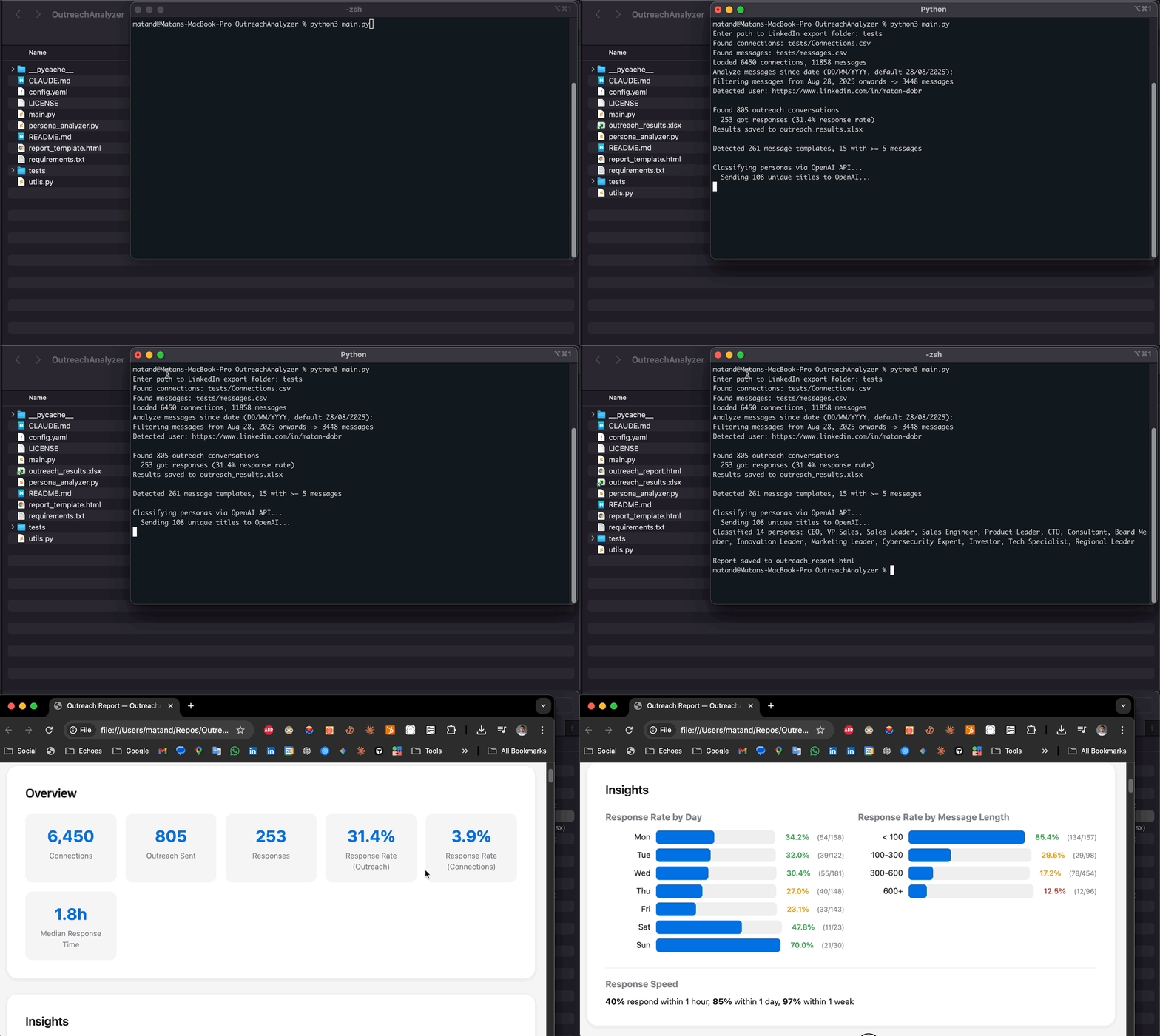
The script handles the heavy lifting that is tedious to do manually:
- Outreach detection - distinguishes messages you initiated from inbound conversations
- Template clustering - recognizes that "Hey Dan, here is my pitch" and "Hey Sarah, here is my pitch" are the same template, even with personalization
- Response tracking - matches replies to original messages and calculates response rates
- Persona grouping - clusters job titles into meaningful categories (optionally using AI for higher accuracy)
The output is a structured HTML report you can open in any browser. From there, you can feed the results into an AI assistant for deeper interpretation - but now you are working with clean, organized data instead of raw CSVs.
Pros: Fast (five minutes end to end), runs locally on your machine, nothing uploaded anywhere, structured output ready for further analysis.
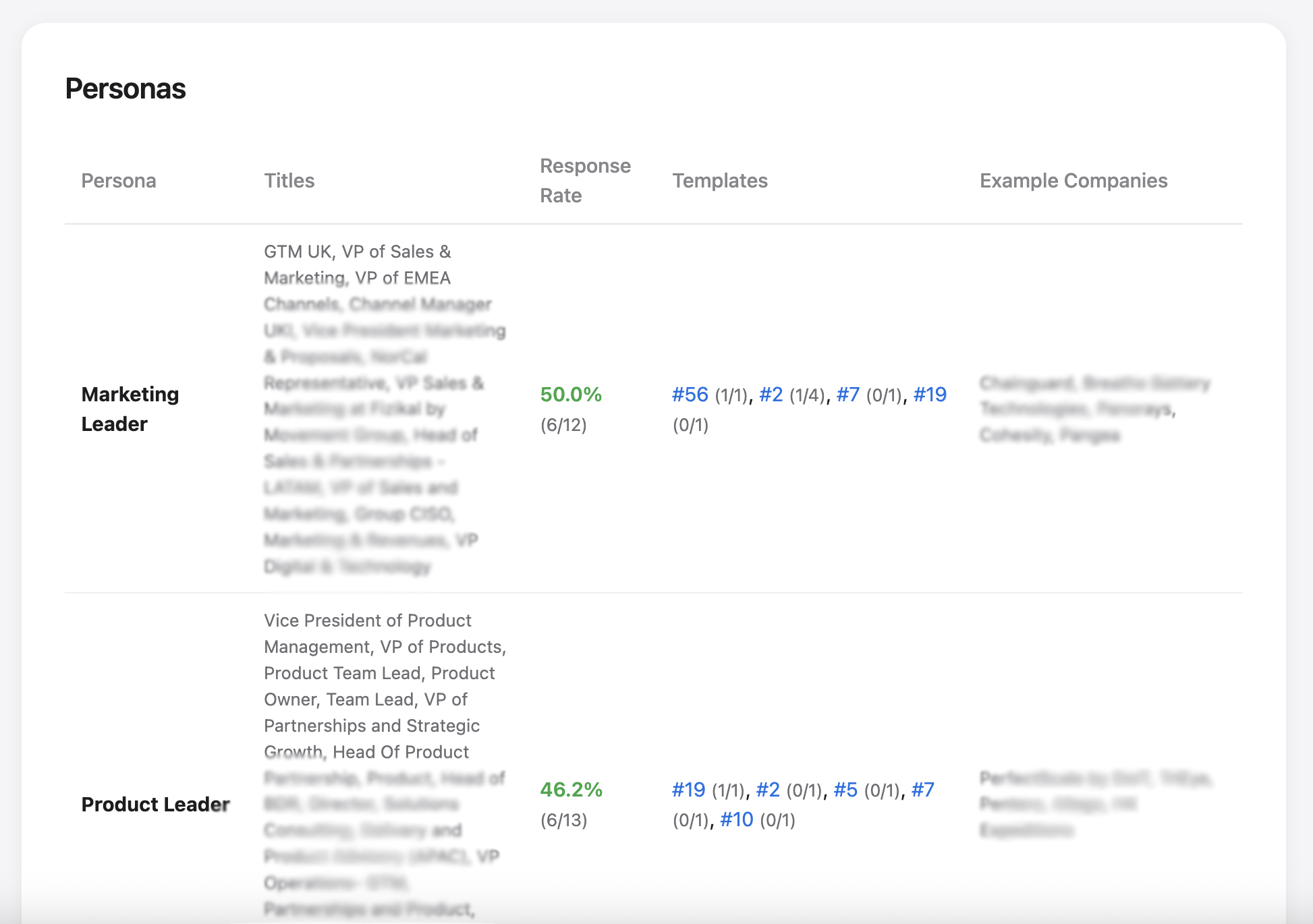
LinkedIn Outreach Insights: What the Data Reveals
We ran OutreachAnalyzer on our own LinkedIn outreach data. Here are some of the patterns that surprised us and changed how we operate.
The same template, completely different results by persona. One of our best-performing templates had a 45% response rate with VP-level sales leaders - but dropped to under 10% when sent to CTOs. A different template that we almost retired turned out to be our top performer with C-level executives. Without segmenting by persona, both templates looked average.
Short messages win by a wide margin. Messages under 100 characters saw response rates 5-6x higher than messages over 500 characters. The data was clear: nobody reads a wall of text from someone they do not know. Our best-performing message was a single sentence.
Timing is not what we expected. Sunday outreach consistently outperformed every weekday, with response rates more than double compared to Friday. The likely reason is simple - fewer people are sending outreach on weekends, so your message has less competition in the inbox.
Response speed tells you when to move on. Over half of all replies came within the first two hours. If someone had not responded within a day, the probability of a reply dropped sharply. This changed how we think about follow-up cadences entirely.
Templates we loved writing were not the ones that worked. We had a 4x gap between our best and worst performing templates. Some of the messages we were most proud of turned out to be our weakest performers. Gut feeling is not a strategy.
Every one of these insights came from our own data - not industry benchmarks or generic best practices. That is what makes this approach so powerful. Your data reflects your audience, your messaging, and your market.
Risk-Free and Fully Offline
It is worth emphasizing: this entire approach uses LinkedIn's official data export - the same archive LinkedIn provides to every user under Settings & Privacy. There is no scraping, no browser automation, no third-party authentication, and no risk to your LinkedIn account.
The script runs entirely offline on your machine. Your data never leaves your computer, no credentials are shared with any service, and nothing connects back to LinkedIn. This is your data, downloaded through the official channel, analyzed locally.
Getting Started
The data is already there. Whether you choose to analyze it manually, explore it with AI, or run the script for a structured report - the important thing is to start looking at it.
Five minutes of setup can change how you think about every outbound message you send.
GitHub: github.com/fullfull-ai/OutreachAnalyzer
If you are interested in how we use data-driven automation beyond outreach, read about how AI is transforming RFP response automation for sales teams.
Want to Optimize More Than Just Outreach?
Full-Fill helps sales teams automate questionnaires, RFPs, and RFIs with evidence-based AI - saving 50-95% of response time.
Start Your Free Trial