
Full-Fill Now Supports Panorays for Security Questionnaires
Full-Fill now supports Panorays inside the browser extension, helping teams automate security questionnaires directly in the platform with evidence-based answers.
We are excited to share that Full-Fill now supports Panorays inside the Full-Fill Extension.
This was one of the most requested additions from teams managing security questionnaires in Panorays, and we are happy to make it available.
The Challenge: Security Questionnaires at Scale
Organizations using Panorays regularly receive security questionnaires from customers and partners as part of third-party risk assessments. These questionnaires are detailed, repetitive, and time-consuming. They often require input from multiple stakeholders across security, compliance, and engineering teams.
For companies managing dozens or even hundreds of these assessments each quarter, the manual effort adds up fast.
A Native Experience Inside Panorays
Starting with Full-Fill Extension v1.1.0, Full-Fill users can automate security questionnaires on Panorays in a single click.
What makes this support different is that it works directly inside the Panorays platform. It respects the way the questionnaire is structured and fills the actual fields in place.
This is not a workaround and it is not a side panel that leaves you copy-pasting answers one by one.
- Fills the actual fields inside Panorays
- Uses evidence-based answers pulled from your knowledge base
- Keeps the workflow inside the platform your team already uses
- Gets questionnaires submission-ready in minutes, not hours
The Full-Fill Extension automates questionnaire responses directly within the Panorays interface.
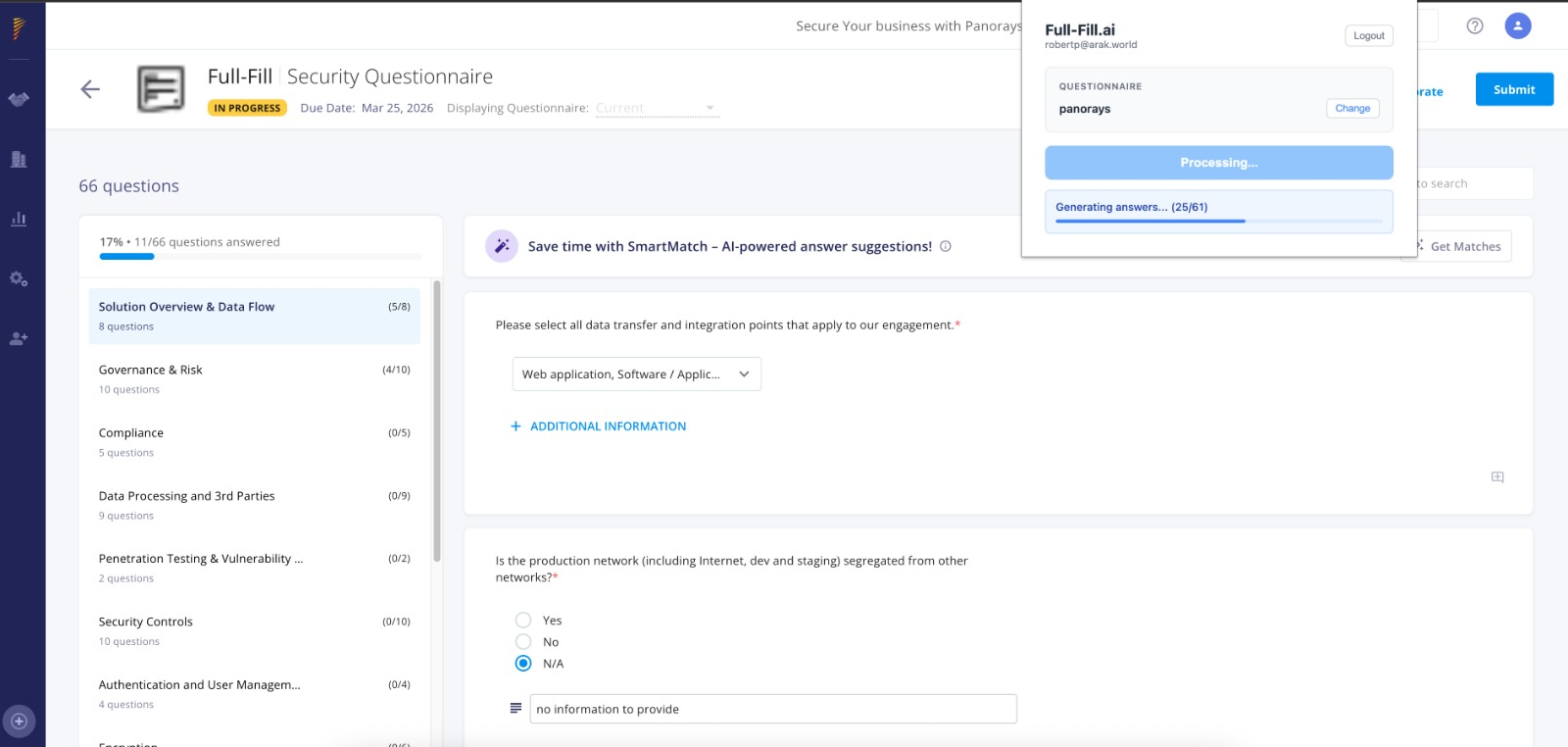
Evidence-Based Answers, Not Generic Suggestions
Unlike other questionnaire automation browser extensions, Full-Fill takes a fundamentally different approach. The extension does not simply suggest answers in a floating panel and leave users to copy and paste them into form fields.
Instead, Full-Fill fills the actual questionnaire fields with complete, evidence-based explanations drawn directly from your organization's knowledge base. All answers and sources are available for review in the Full-Fill platform, just like any other questionnaire. This also makes collaboration, maintenance, and future reuse much easier.
The result is a submission-ready questionnaire, not a starting point that still requires hours of manual work.
Why We Added This
This was one of the most requested platform support additions we have had for a while.
Teams told us they wanted the same Full-Fill workflow they already rely on, but directly inside Panorays. So we made it happen.
"This is one of the most requested features we have had for a while, and it is great to see how well it works. It really is as simple as one click and you get the questionnaire filled immediately with answers that reflect the real story. We never guess. We always provide evidence-backed answers and explanations."
- Matan Dobrushin, CEO, Salora
Getting Started
Once logged in to the Full-Fill Extension using your standard Full-Fill credentials, navigate to a questionnaire in Panorays, click Run Full-Fill, and leave the dialog open. In a few minutes, the answers will be filled directly in the platform.
If needed, you can review, tag co-workers, approve answers for future use, and export. After submission, the questionnaire will also be available for future review just like any other questionnaire in Full-Fill.
Want to Automate Panorays Questionnaires?
See how Full-Fill can help your team answer security questionnaires faster with evidence-based answers.
Start Your Free Trial